IP2・IP4設定マニュアル(RTX1100/RTX1200)
対象サービス
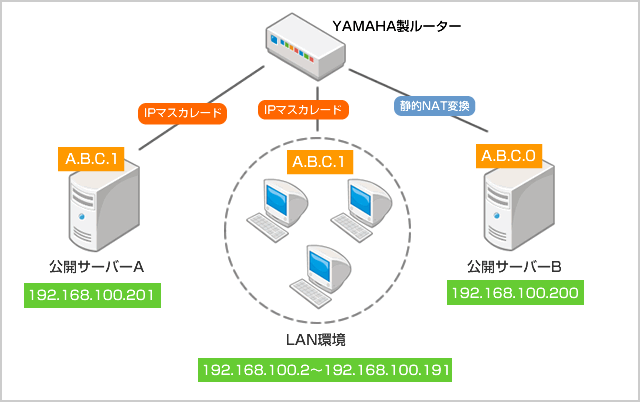
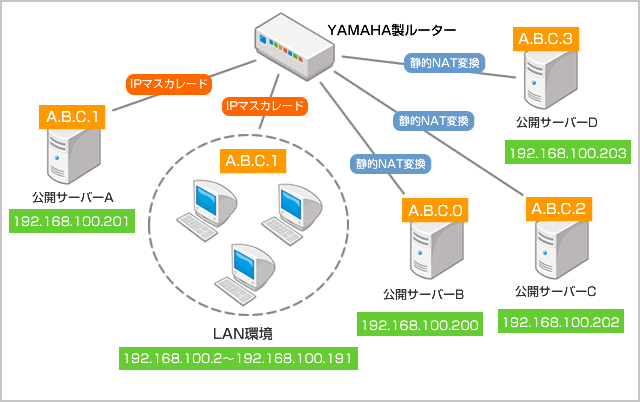
YAMAHA製RTX1100とRTX1200を利用した、IP2とIP4の設定方法を説明いたします。 説明内容は、それぞれ以下のネットワーク構成を前提とします。
前提となるネットワーク構成について
IP2の場合
| 設定項目 | 設定値 |
|---|---|
| 固定IPアドレス | 1.2.3.0 1.2.3.1 (IPマスカレード用) |
| LAN側の環境 | 公開サーバーA: 192.168.100.201 (IPマスカレード用) 公開サーバーB: 192.168.100.200 LAN端末: 192.168.100.2 ~ 192.168.100.191 |
| 利用ルーター | RTX1100もしくはRTX1200 |
IP4の場合
| 設定項目 | 設定値 |
|---|---|
| 固定IPアドレス | 1.2.3.0 1.2.3.1 (IPマスカレード) 1.2.3.2 1.2.3.3 |
| LAN側の環境 | 公開サーバーA: 192.168.100.201 (IPマスカレード) 公開サーバーB: 192.168.100.200 公開サーバーC: 192.168.100.202 公開サーバーD: 192.168.100.203 LAN端末: 192.168.100.2 ~ 192.168.100.191 |
| 利用ルーター | RT58iもしくはNVR500 |
接続設定マニュアル
-
TELNET・SSHもしくはコンソールでログインします。
-
以下のとおり入力します。
IP2の場合
ip route default gateway pp 1
ip lan1 address 192.168.100.1/24
pp select 1
pp keepalive interval 30 retry-interval=30 count=12
pp always-on on
pppoe use lan2
pppoe auto disconnect off
pp auth accept pap chap
pp auth myname ユーザーID パスワード
ppp lcp mru on 1454
ppp ipcp msext on
ppp ccp type none
ip pp nat descriptor 1000
pp enable 1
nat descriptor type 1000 nat-masquerade
nat descriptor address outer 1000 1.2.3.0-1.2.3.1
nat descriptor static 1000 1 1.2.3.0=192.168.100.200
nat descriptor masquerade static 1000 1 192.168.100.201 tcp 20-587(※)
dhcp service server
dhcp server rfc2131 compliant except remain-silent
dhcp scope 1 192.168.100.2-192.168.100.191/24
dns server pp 1
IP4の場合
ip route default gateway pp 1
ip lan1 address 192.168.100.1/24
pp select 1
pp keepalive interval 30 retry-interval=30 count=12
pp always-on on
pppoe use lan2
pppoe auto disconnect off
pp auth accept pap chap
pp auth myname ユーザーID パスワード
ppp lcp mru on 1454
ppp ipcp msext on
ppp ccp type none
ip pp nat descriptor 1000
pp enable 1
nat descriptor type 1000 nat-masquerade
nat descriptor address outer 1000 1.2.3.0-1.2.3.3
nat descriptor static 1000 1 1.2.3.0=192.168.100.200
nat descriptor static 1000 2 1.2.3.2=192.168.100.202
nat descriptor static 1000 3 1.2.3.3=192.168.100.203
nat descriptor masquerade static 1000 1 192.168.100.201 tcp 20-587(※)
dhcp service server
dhcp server rfc2131 compliant except remain-silent
dhcp scope 1 192.168.100.2-192.168.100.191/24
dns server pp 1
※1.2.3.1のサーバーで公開するサービスによって適宜変更してください。tcp 20-587はTCPの20番~587番までを開放する設定です。
※設定を間違えた場合、no nat descriptor masquerade static 1000 200 192.168.100.201 tcp 20-587 とすれば、設定が削除されます。
-
show configで設定が確認できたら、saveしてrestartします。
以上で設定完了です。
各サーバーやPCで固定IPアドレスで通信できるかご確認ください。
設定の確認は、[トップ] > [詳細設定と情報] > [本機の全設定(config)のレポート作成] からできます。